CS201
Lab 5 - Looping, looping, and even more of looping...
Objectives:
- Use loops to read from files and to perform incremental calculations.
- Learn how to declare and use 1D arrays.
Readings:
- Read Chapter 5 in the Hanly/Koffman text.
- Read Section 8.1-8.3 in the Hanly/Koffman text (you can finish on p. 376).
Deliverables: (DUE BY END OF LAB!)
- Submittal of your lab5.c and Makefile
files.
TO DO (for today's lab)
- Design and Write a program to solve Programming Project #11
on page 277 of the Hanly/Koffman text.
- Use fscanf to enter your base_size
height_size values. Do not prompt for these values, just read them in from
two data
files using
fscanf for a change.
This time you need to declare base_size and height_size
as arrays of integers, where base_size should
be capable of storing 5 elements (of int
type), and height_size needs to have room for
6 elements (of int type). You will read the
values from two files stored in your current directory (the input files need
to be named datain5base and datain5height,
and stored in your current directory).
- Use a for-type loop, that counts forward, to
read data from datain5base file to base_size
array.
- Use a for-type loop, that counts backwards
(i.e. uses negative steps), to read data from datain5height
file to height_size array. Make sure that
despite using decreasing counter (i--), your
still read and assign values to array in increasing order (i.e. first iteration of the
loop assigns the first value from the datain5height
file to the first element, i.e.: base_size[0]).
This one might be slightly tricky, so make sure you start and finish the loop in
the right moment.
- Use only while-type or do-while-type
loops to print out your output on the screen. Make sure to format output
in exactly the same way, as presented below (Beginning of my output command
has the following structure: printf("%2dBxB%2dBB%3dBBBBBBBBBBBBB%7.2fBBBBBBB%6.2f",
... where B's are blanks).
- For your first input data file build a file with 5 lines. Store only one number
per line (assume that all numbers are integers). E.g.:
2
4
6
8
10
-
Call this file datain5base and save it to your
current (i.e. lab5) directory.
- For your second input data file, that provides values for height_size
array, you need to do almost the same. This time however the file needs
to store 6 numbers in 6 lines, and it needs to be named datain5height.
- A sample run of your program assuming "lab5" for the name of
your
run image would look like the following:
$ lab5
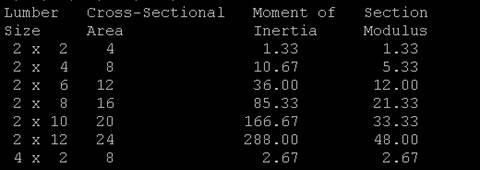
- A begining of sample output may look like the following:
LumberBBBCross-SectionalBBBMomentBofBBBSection
SizeBBBBBAreaBBBBBBBBBBBBBBInertiaBBBBBModulus
2BxBB2BBB4BBBBBBBBBBBBBB1.33BBBBBBBB1.33
2BxBB4BBB8BBBBBBBBBBBBBB10.67BBBBBBBB5.33
2BxBB6BBB12BBBBBBBBBBBBBB36.00BBBBBBBB12.00
2BxBB8BBB16BBBBBBBBBBBBBB85.33BBBBBBBB21.33
2BxB10BBB20BBBBBBBBBBBBBB166.67BBBBBBBB33.33
2BxB12BBB24BBBBBBBBBBBBBB288.00BBBBBBBb48.00
4BxB 2BBB8BBBBBBBBBBBBBB2.67BBBBBBBb2.67
- ...
- The automatic submittal script will expect your output to
be formatted exactly as shown above. The B's are
blanks. Here is a screen-shot if you need it (this is only a few lines of the
output you need to generate):
-
- You do not need to submit your sample data files. I will provide
a set of test data files for the automatic script to use to
test your program.