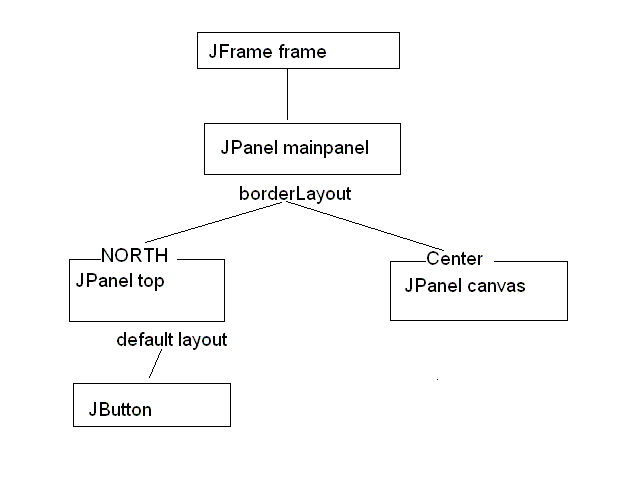
import javax.swing.*;
import java.awt.event.*;
import java.awt.*;

public class Example
{
	private Graphics g;
	private JPanel canvas;
	private int flag;
	public Example()
	{
	    flag=0;
	    JFrame frame = new JFrame("Example assignemnt");
	    JPanel mainPanel = new JPanel();
	    mainPanel.setLayout(new BorderLayout());
	    canvas = new JPanel();
	    canvas.setBackground(Color.white);
	    JPanel buttonPanel = new JPanel();
	    buttonPanel.setBackground(Color.blue);
	    JButton button = new JButton("Don't push me");
	    button.addActionListener(new myButtonHandler());
	    buttonPanel.add(button);
	    mainPanel.add(buttonPanel, BorderLayout.NORTH);
	    mainPanel.add(canvas, BorderLayout.CENTER);
	    frame.getContentPane().add(mainPanel);
	    frame.setSize(400, 400);
	    frame.setVisible(true);
	}
	public void drawApplet()
	{
	   if(flag==1){
	       g = canvas.getGraphics();
	       g.setColor(Color.red);
	       g.drawString("This program will blow up in five seconds", 45, 180);
	    }
	}


	class myButtonHandler implements ActionListener
   {
              public void actionPerformed(ActionEvent e)
              {
                  drawApplet();
                  flag=1;
              }
        }
}
So now you do this to the following program Click here to see it
You are to do the following today:
- Create the diagram for the TicTacToe example
- Program the layout of the program.
Good Luck