 |
CS 150 Computer Literacy Internet - continued |
 |
The internet address
- The user id is on the left side of the @
- The host/network is on the right side of the @ sign
- domain hierarchy
- identifies the type of organization that server or client is associated with host computer names
- com - commercial enterprises
- edu - educational institutions
- net - networking organizations
- gov - government
How does your mail get to you?
|
|
|
|
|
|
|
|
|
|
|
|
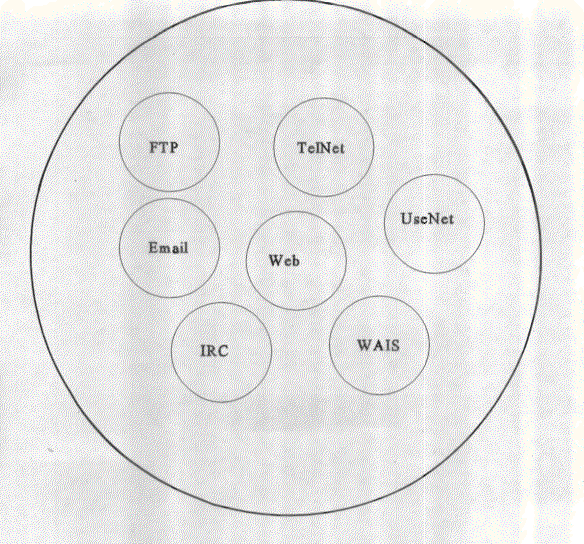
Services Available
- USEnet - newsgroups mailing lists
- TelNet - log on to other computers
- FTP - file transfer protocol
- Gopher - search for data across the world
- Wais - wide area information search
- IRC - internet relay chat
- Telephony - combining telephone technology with computer technology
- WWW - world wide web
- E-mail - very popular stuff
Client vs Server
Server
- Can be anything from a PC to a supercomputer
- Supplies computing services
- stores information or data
- Databases
- Files
- Graphics
- Full motion video
- Sounds
Client
- Can also be anything from a PC to a supercomputer
- Typically a PC or a Workstation
- Requests the information or data
- Uses computing services offered by server
Internet Addresses
Every computer location on the Internet as a numeric address, my web server http://www.cs.montana.edu, translates to the numerical address 153.90.199.47. This numeral address is know as the IP address.
My web address
Domain name = www.cs.montana.edu/~perkinsm
IP address = 153.90.199.47/~perkinsm
- Type in the IP address instead of the domain name and you will get the same result.
- Your computer sends a request with the domain name.
- The request goes to a Domain Name System (DNS) Server that looks up the domain name you typed in a huge table that resides on the DNS Server. The table has domain names linked with IP addresses, so the domain name you've requested is translated into an IP address.
- After the IP address is found your request is resubmitted with the IP address.
- The Internet uses the IP address as a routing scheme, each layer of numbers means something to the computers searching for your request.
- When you type in a domain name and hit enter all the steps above are handled, and then your request must travel to wherever the server you are looking for is located. Then that server must pack up your request and ship that request back to you. There is a lot going on, but it happens within micro-seconds.
How data travels
- When you make your request for a Web page the computer builds the request for you. It then will divide your requests into small chunks called packets.
- Something small like a single request might be one packet, but something like a Web page with a lot of graphics might be divided into several packets.
- Dividing the data into packets allows the computers to move the data faster.
- Each packet contains part of the data being sent and a header that has the destination, origination point, how many packets the data was divided into, and a few other admin type things.
- Once the data is divided into packets and sent across the Internet, the packets might not take the same route to the destination. If you are in Montana, and the data is being sent from Georgia, there is a chance that one packet might go through Texas, and another through Chicago.
- At the destination the packets are reorganized and then the data is displayed.
TCP/IP
- TCP/IP is a protocol on how the computers communicate and move the packets across the network.
- Transmission control protocol/Internet protocol
- Protocols are a set of rules and procedures, the computer must have rules and procedures to communicate. It's like talking in English, if you are talking in English you are communicating with the English protocol. Computers communicate with the TCP/IP protocol.
- We will discuss the different protocols in the Networks lectures later in the semester.
Viruses
Viruses started in 1981 - they are designed to get on your computer, so something, then go to another computer
They can delete files, corrupt files, and make your computer unusable
Defend against them!
It is better to not get a virus than to try and remove one from your system.
Make sure your firewall is on
Have all the latest Windows updates - use automatic updates
Use anti virus software
Norton (Symantic)
McCaffe
AGV
Don't open any email from people you don't know
Spyware / Adware
Can be removed with spybot or adaware