 |
CS 150 Computer Literacy Storing Data |
 |
-
Primary Memory(main memory) refers to RAM (volatile).
-
Secondary Storage - Long term storage (nonvolatile).
-
Examples
-
Magnetic disk drives, like hard disk or floppy disk
-
Optical laser disk, like CD or DVD ROM
How files are stored
- Files are defined by the software that created them.
- Encoded data.
- Data files
- Document files
- Spreadsheet files
- Source Program files
- Executable file
- Graphics file
- Audio/Video files
- The files are stored by addresses
- Operating System keeps track of addresses
- You have to know the name (combination to the lock).
- Data and Files Access
- Sequential Access - data is stored in sequence
- Direct Access - means that the computer can go directly to the information you want
- Speed
- Table 7.20 on the text book.
- Access time
- Data transfer rate
- Processing tasks
- Batch VS Real-time processing - later versus
now.
- Batch processing: data is collected over several
days or weeks and then processed all at one time, as a "batch".
- Example: You deposit a check in the morning, but doesn't compute your account balance till the end of the day when all checks have been processed
- Real-time processing: records information
immediately.
- Airline ticket reservation has to process transactions immediately so they don't sell the same seat more than once.
- Batch processing: data is collected over several
days or weeks and then processed all at one time, as a "batch".
The following are all long term storage devices,and the different
ways and reasons they are needed.
Magnetic Tape
- Magnetic Tape is a thin plastic tape coated with a substance that can be magnetized; data is represented by the magnetized or nonmagnetized spots.
- Where used?
- Magnetic Tape is for big operators, they are used mostly for duplicate storage or backup.
Magnetic Disks (Read all this in the book it is very important on the test, the notes are just an outline of the book, read the book).
Most computers come with two types
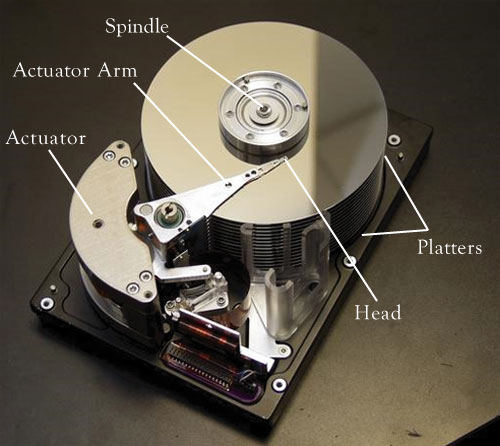
- Disk drive is a device that holds, spins,
and reads data from and writes data to a diskette.
- The diskette
- 5 1/4 inch diskette (The eight track of computers)
- 3 1/2 inch diskette (The cassette of computers)
- Zip disk drive
- The hard disk
- The diskette
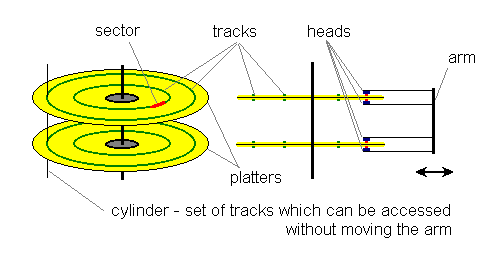
- Magnetic disk Organization
- Tracks and Sectors (Figure 7.21)
- Tracks use serial representation which is magnitizing the surface in a row in the track.
- The Sector organization
- Cylinders - Tracks on Tracks
- A few little facts about Hard drives
- 1993- Average hard disk is 200 megabytes
- 1996 - Average disk is 1.2 gigabytes
- November 1997 IBM introduces an 8.4 gigabyte
- September 1999 I hada computer in my office with 30 gigabytes for cheaper than the 1996 harddrive
- 2003 You can get a harddrive that is 250 Gigabytes for your personal computer.
- 2005 A new IPOD has more memory than all of the memory in the world 30 years ago. It fits on your belt. The same amount of memory in a current IPod in 1972 would be a platter about 500 square miles wide.
- Sometimes you will hear the phrase "Head Crash", this happens when the surface of the read/write head or particles on it's surface come into contact with the disk surface, causing the loss of some or all of the data on the disk.
- Two types of Hard drive connections:
- EIDE - most common, it uses a flat ribbon connector to plug straight into the Motherboard.
- SCSI (scuzzy) - A different type of technology that allows you to daisy chain, or what might be called piggy back several devices together. Your book says SCSI isn't faster, but 90% of time it is faster. SCSI drives usually plug into an expansion card.
- Formatting a Disk -
- Preparing the disk for use so that the computer's operating system software can write information on it. This includes defining the tracks and sectors on it.
- With windows operating system the disk is also
set up with FAT, the file allocation table.
- The FAT tells the system where to find files and folders, which sector and track, the date of the last change. Most of the stuff you see in Windows Explorer.
- Checks for defects on disk.
- Erases everything on disk.
Virtual Memory - With help of the operating system the computer uses a special set up swap space on the hard drive as an extension of RAM. The data still has to be switched to RAM before it can be accessed by the processor, but if the RAM is full the computer will use the harddrive to swap in and out items that are needed by the processor.
Optical Laser Disk
- CD-ROM
- Technology - The digital data is represented
by microscopic pits that have been burnt into the surface of
the disk and land(flat areas). Representing the 1's and 0's.
- High powered laser light creates the pits
- Low powered laser light redes the items from the compact disc by reflecting light through the bottom of the disc, which usually is either solid gold or silver in color.
- Land causes light to reflect, which is read as a binary digit 1. Pits absorb the light; this absence of light is read as a binary digit 0.
- The disc is comprised of tracks and sectors like the harddrives.
- Technology - The digital data is represented
by microscopic pits that have been burnt into the surface of
the disk and land(flat areas). Representing the 1's and 0's.
- Most computers today come with a CDROM and
a DVD-ROM.
- CDROM can hold nearly 700MB of data, instructions and information. Or about 450 times what can be held on a floppy disk.
- Speed - extremely important when viewing animation
or video such as those found in multimdia applications such as
encyclopedias and some games.
- Measured by its data transfer rate, which is the time it takes to transmit data from the CDROM to another device usually RAM.
- The original CDROM was a single speed drive with a data transfer rate of 150kb per second.
- All subsequent CDROMS drives have been measured
relative to this original speed.
- 16X is (16*150)KB per second or 2,400K(2.4MB).
DVD-ROMS
- Digital Video Disc - ROM
- Capable of storing 17GB Large capacity.
- More than enough to hold a telephone book with every resident in the U.S.
- The storage capacity surpasses CDROMS and so does the quality.
- The DVD dries can also read CDROMS
- What I've figured out so far is there is three
different ways of storing data on a DVD:
- The first technique is making the disk more dense by packing the pits closer together.
- The second is using two layers of pits, for this technique to work the lower layer of pits is semitransparent so the laser can read through it to the upper layer.
- The third is having double sided DVD's which means at some point you have to flip the DVD.
- A DVD with two layers and two sides, plus the density change can hold up to 17GB's.
Compression and Decompression
Compression
is a method of removing redundant elements from a computer file
so that it requires less storage space. Compression and decompression
techniques are called codec techniques. The two principal compression
techniques are "lossless" and "lossy".
The solution for putting more data into less space comes from the mathmatical proess called compression.