CS201
Lab 6 - Multiple File Compilation
Objectives:
- Solve a hospital supply problem using a C program.
- Understand differences between passing parameters "by value", and "by
reference".
Readings:
- Read Chapter 6 in the Hanly/Koffman text. Before starting this assignment, make sure you go through Lecture 11.
Deliverables: (DUE AT THE END OF YOUR NEXT LAB!)
- Submittal of the following files:
- Makefile
- proto.h
- lab6.c
- get_problem.c
- get_rate_drop_factor.c
- get_kg_rate_conc.c
- get_units_conc.c
- fig_drops_min.c
- fig_ml_hr.c
- by_weight.c
- by_units.c
TO DO (for today's lab)
- Design and Write a program to solve Programming Project #2
on page 321-323 of the Hanly/Koffman text.
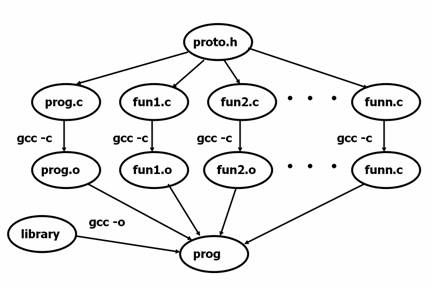
- You will need to build 11 separate source files (listed above!) and modify
your Makefile to properly rebuild the run image. Here is
more info on linking the source files.
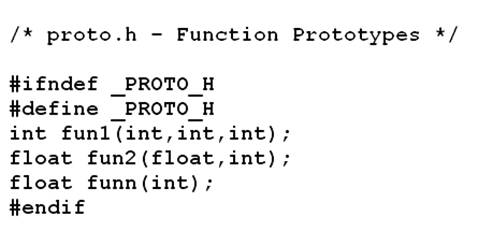
- File proto.h should include prototypes of all functions mentioned in your
textbook (p. 322). Here is more
info on the role of proto.h.
- Make sure to test your program thoroughly. You may enter inputs from keyboard or from file to perform the tests, however we will be entering inputs from the keyboard when checking your work. Here
is more info on this topic.
- Your program should output an error message if the choice is anything other than (1-5).
-
Use integers for all parameters except the rate
in mg/kg/hr (job no.3 in your project) which will need to be a double.
- Be careful about implementing each function properly so that it fulfills the "pass by value" or "pass by reference" requirements specified in the problem definition. "pass by reference" is mentioned as output parameters in your text book.
- Comment your code appropriately. We would like to see characterization of
function, variables, Pre- and Post-conditions etc. for every function you
write.
- And now study the hints below.
Helpful Hints
Declaring prototypes in a
header file
I like to put all my prototypes in a separate file (here, I called it proto.h)
and then to include this file in my main program (#include
“./proto.h”). When you do it this way, you may need some additional
pre-processor directives to avoid duplications of your declarations (just to
play it safe...). This time, file proto.h should include prototypes of all functions mentioned in your textbook
(p. 322). Here is a sample proto.h file (I included pre-processor directives to avoid
accidental duplications of my functions' prototypes):
Linking the source files
OK, so here is an example of what you want to do (using your Makefile):
And here is how you can get there:
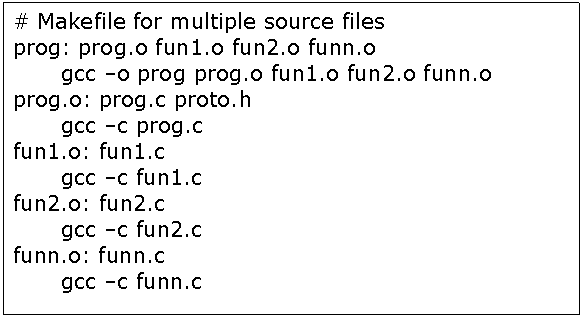
References to
proto.h in the Makefile can be omitted, if you included it as I mentioned
above. Repetitions do
not bother us, since we used Conditional Compilation in our header file.
Testing the program
You can test your program by controlling it from your screen and keyboard. For a test run
of only problem 4 you can enter the followings after respective prompts:
4
1000
25
5
The above data should produce the following results.
The rate in milliliters per hour is 40.
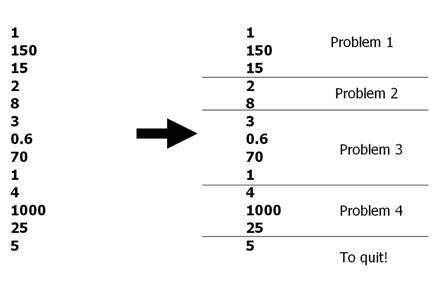
You can also write test files (with job selections and relevant data entries)
and use input redirection. For instance if you enter to test numbers
to your test file as presented on the left-hand side of the figure below, you can simulate
some
cases, as presented on the right-hand side of the figure.
Formatting the output
There will be quite a few prompts coming out of your
program. You will need to have them formatted exactly as shown in the
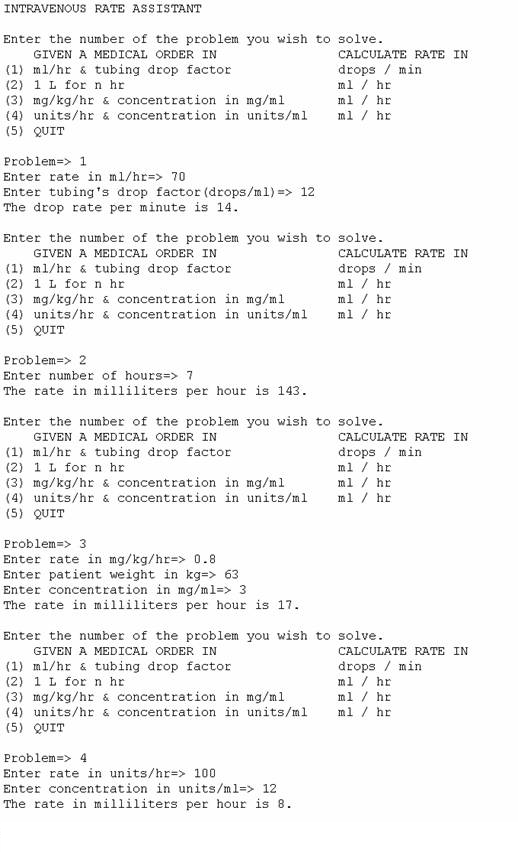
textbook. Here are some results I got, maybe you will find it useful when programming:
Grading Scheme
Program compile and execute 20%
Program meets all specifications 60% (e.g. makefile, pass by value/reference, menu etc. Also ask your TA specifically about what preciously he is looking for)
Program follow code conventions and contain proper documentation. 20%