Sit at the computer that has been assigned to you, everyone has a robot assigned and almost everyone has
a partner assigned.
Big Hint
If you turn your light sensors out a bit so they hit at just a slight angle and they're not straight
up and down they work a lot better.
I am hoping everyone will get through part one. At least close. I don't think many, if any, will get through all the parts.
Part One
Use one light sensor to follow line and ultrasound to detect blockage.
Here is a video of the robot performing how it should perform for this part:
Hints
First start a brand new project, don't use an old project, don't import old code. Create your main and
in the first lines of the main create the objects Do not use the classes from last lab, just instantiate the objects straight from the API)
for all the tools you'll need, they are as follow:
Display
AnalogInput (which will be where the light sensor is plugged in, probably 6 or 7).
Motor (you'll need two one for leftMotor and one for rightMotor).
SonarRangeFinder
PushButton (for starting the movement)
The API can be pulled up from the help menu on RoboJDE.
Here is psuedo code on what your program should look like:
//import statements
import com.ridgesoft.intellibrain.IntelliBrain;
import com.ridgesoft.io.Display;
import com.ridgesoft.robotics.PushButton;
import com.ridgesoft.robotics.AnalogInput;
import com.ridgesoft.robotics.Motor;
import com.ridgesoft.robotics.ContinuousRotationServo;
import com.ridgesoft.robotics.SonarRangeFinder;
import com.ridgesoft.robotics.sensors.ParallaxPing;

main()
{
    initialize display;
    initialize lightSensor;
    initialize Motor for left wheel;
    initialize Motor for right wheel;
    initialize SonarRangeFinder;
    initialize PushButton;

     while start button is not pressed loop
            take sample from light sensor
            print out value to display             // this part is good for seeing how the sensor is working before movement
     end while loop


     Start infinite loop

     	ask sonar for distance
     	if distance greater than 0 and less than some small thresh
           then stop motors
     	else
            take light sample
            // then do the following calculation to figure out the power you need for each wheel
            float offset = (360.0 - (float)lightValue) * 0.016;
            set right motors (8.0 + offset)
            set left motors (8.0 - offset)
     end of infinite loop

}//end of main
The calculation on the motor power should steer the robot around the line according
to a proportion of the light sample reading. Do the math.....
if you have a reading of 30......your power setting on both wheels will be.....
if you have a reading of 700.....your power setting on both wheels will be.....
That is all the code you should have in your project, one class, one method, it's very simple.
It should work.
Part Two
Using both light sensors traverse smoothly around the line.
As you can see in the video using two sensors makes the robot much, much smoother.
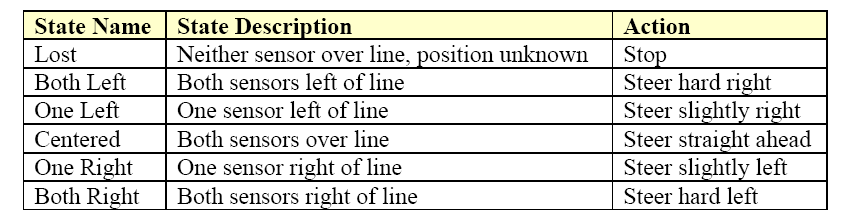
Considering the position of the two sensors relative to the line, at any point in time the robot will be in one of six states
shown in the table below:
The actions in the table define the actions your robot will need to take in order to follow the line.
For example when both sensors are over the line the robot will need to steer straight.
If the robot gets right of the line so the left sensor is on the line and the right is off you need ot steer slightly right
to get it back. Etc. etc.
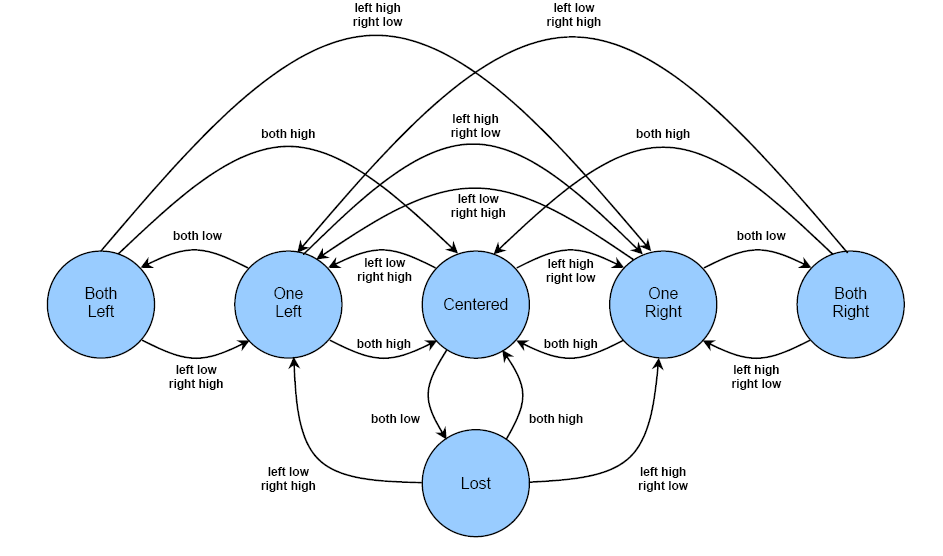
Another way to represent these states is using a state diagram. EE, CS and CE majors will see lots of state
diagrams over the next several years. After you understand the notation it is fairly easy to comprehend.
Notice that the six states we have already discussed are each represented by a bubble in the diagram. The arrows represent the conditions that cause the state machine
to transition from one state to another. Specific conditions which cause each transition are listed next
to the arrow for that transition. In this case, the conditions are changes in the line sensor readings. For example the state
machine will transistion to the Centered state anytime both sensors are read high. Notice you can transtion to this state from
any of the other five states.
Now start a new project from scratch and use the followign pseudo code algorith to attempt to traverse the line
smoothly
More psuedo code:
Same import statements

main()
{
	initialize all the elements like last time.

        while(true)
        {
             sample sensors
             evaluate conditions
             look up new state
             perform actions for new state
         }
}

Part Three
Using both light Sensors and the ultraSound to stop if blocked.
Notice the following video uses the two sensors and ultraSound. The use of ultraSound makes the robot a little
more jumpy than when there is no UltraSound being used. It causes just enough delay to make you notice.
The code is the same as step two besides adding in the ultraSound from the first part above.


Grading
Make sure you team gets credit for doing as much of the lab as you can get done by the end of class.


Remember there is another lab class waiting to come in after you so when the time period is up please move on and let the new class on the computer.