Lab 4: Grocery Shopping List
Due Date and Submission Requirements
- Due Date: Thursday, December 10th no later at 11:59 p.m.
- Partner Information:You may complete this assignment individually or with exactly one partner.
- Submission Instructions (working alone): Upload your solution (.py file), entitled YourFirstName-YourLastName-Lab4.py to the BrightSpace(D2L) Lab 4 Dropbox.
- Submission Instructions (working with a partner): Upload your solution (.py file), entitled YourFirstName-YourLastName-PartnerFirstName-PartnerLastName-Lab4.py to the BrightSpace(D2L) Lab 4 Dropbox.
- Deadline Reminder: Late passes can be used on this assignment. However, if you do not use a late pass and submit it past the deadline, you submission will lose some points (see late assignment policy). After 48 hours,
the dropbox will close and you will no longer be able to submit
In order to complete this lab, you will need to understand
- Iteration
- Lists
- Functions
Background and Directions
You will be creating a virtual shopping list. Users can (1) view the grocery list, (2) add to the grocery list, (3) remove something from the grocery list, or (4) check to see if they already have an item on the list
Using lab4.py as a starting point , define and fill in the missing functions. The grocery list is represented by a python list
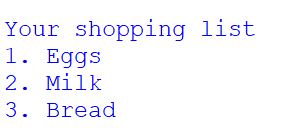
- print_grocery_list() should take in the grocery list, and print it out in a nice, numbered manner as seen in this screenshot
- add_to_grocery_list() should take in the grocery list and an item the user wants to add. You will add it to the list and then return the new list with the new item added
- remove_from_grocery_list() should take in the grocery list and an item the user wants to remove. You will remove that item from the list and then return the new list with the item removed
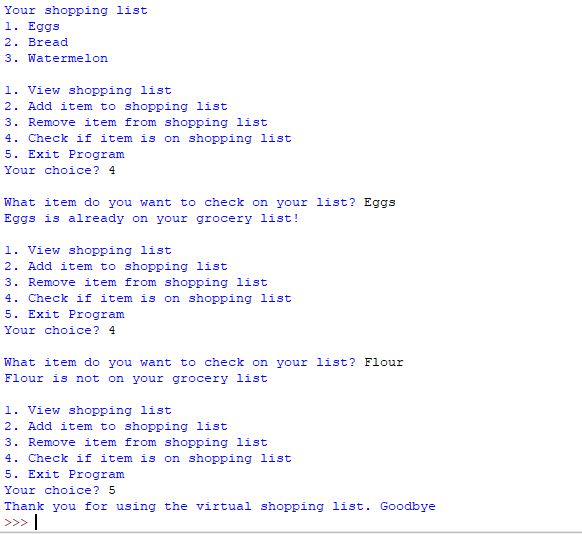
- check_if_item_on_list() should take in the grocery list and an item the user wants to check if its already on the list. If the item is already on the list, then " is already on your grocery list!" should be printed out.
If the item is not on the list, then " is not on your grocery list!" should be printed out.
Hints
- We've talked about easy ways to add and remove things from lists
- Is your list not updating properly after adding/removing? Make sure you are returning the correct value
- Note that the items are case sensitive, so make sure that you input "Bread" and not "bread" when removing an item, for example.
Sample Output
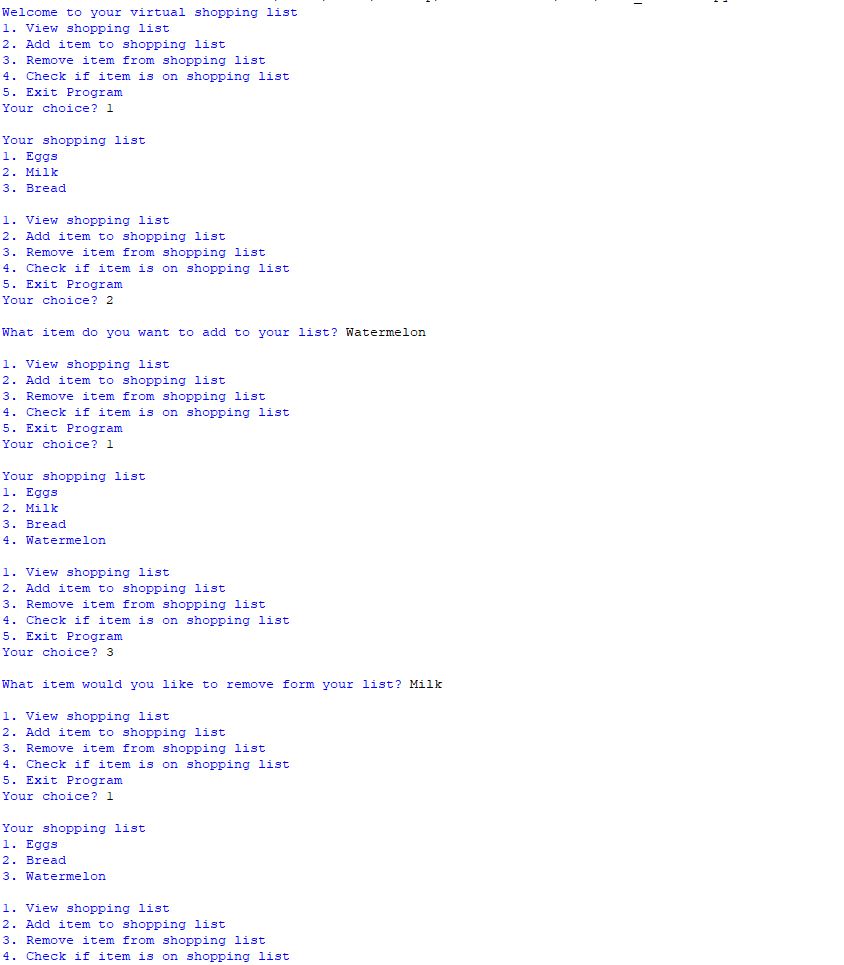
When your program is run, it should follow a similar behavior as seen in this sample output and this sample output .
Required Python Comment
Place a Python comment at the top of your Python solution that is formatted as follows
# -----------------------------------------+
# Your name                                |  <-- e.g. Reese Pearsall
# CSCI 127, Lab 4                          |
# Last Updated: Month Day, Year            |  <-- e.g. December 3, 2020
# -----------------------------------------|
# A brief description of the assignment.   |  <-- can be more than 1 line
# -----------------------------------------+
Grading (10 points)
- 2 points - print_grocery_list() is defined and properly prints out the list of groceries just like in the sample output
- 2 points - add_to_grocery_list() is defined and properly adds the item to the grocery list
- 2 points - remove_from_grocery_list() is defined and properly removes the item from the grocery list
- 2 points - check_if_item_on_list() is defined and properly prints out whether or not the item already exists on the list
- 1 point - The sample output is followed in your submission
- 1 point - The required Python comment appears at the top of your file
Grading turnaround
I will try to have your grades posted within 4 days after the submission deadline